1-12: Multiple Conditions
0.1 Changes
1 Purpose
- Check for multiple conditions on variables
2 Questions about the material…
The files for this lesson:
Script: you can download the script here
This lesson’s data has two new columns in it compared to the previous lesson’s data – so 14 obs. of 7 variables (instead of 5). The new columns (noonCondMessy and precipBad) are copies of the previous columns with some issues added that are addressed in this lesson.
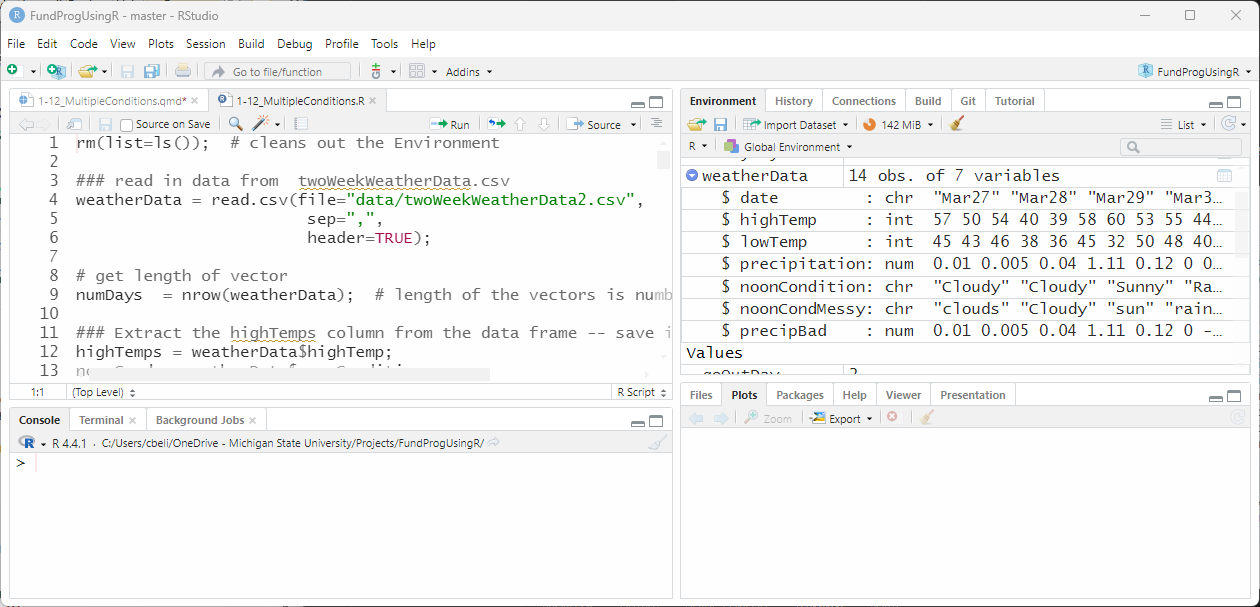
If you have any questions about the material in this lesson, feel free to email them to the instructor, Charlie Belinsky, at belinsky@msu.edu.
3 Logical Operators: AND (&), OR (|)
In this lesson we are going to learn how to creaste conditional statements with multiple conditions using two new operators: AND, OR. The symbol for the AND operator is the ampersand ( & ) and the symbol for the OR operator is the vertical pipe ( | ).
Note: In R, there are corresponding && and || operators. For beginners in R, you almost always want to use & and |. For a detailed, and somewhat advanced, explanation of the difference go here: Extension: & vs && and | vs ||
The AND operator combines two conditions into one conditional statement with the rule:
- if both of the conditions are TRUE then the whole conditional statement is TRUE
if (condition1 & condition2) # if both condition1 and condition2 are TRUE
{
   # Execute the code between these curly brackets
}
The OR operator combines two conditional statements into one conditional statement with the rule:
- if either of the conditional statements are TRUE then the whole conditional statement is TRUE
if (condition1 | condition2)  # if either condition1 or condition2 is TRUE
{
   # Execute the code between these curly brackets
}
3.1 Operators we have learned so far
& and | are R logical operators and now would probably be a good time to take a quick step back and look at all the operators we have learned in this class.
| Operator Type | Purpose | R Symbols |
|---|---|---|
| Assignment | assign a value to a variable | =, <-, -> |
| Mathematical | Perform a mathematical operation on a numeric value | +, -, *, /, ^ |
| Subset | Subset a vector | [ ], $ |
| Conditional | Compare two values | ==, !=, >, <, >=, <= |
| Logical | Combine conditions | &, &&, |, || |
4 Combining conditional statements (logical operators)
In the last lesson we started by asking two questions about noonCond that both had one condition:
Is the day sunny?
Is the day rainy?
#### From last lesson
sunnyDays = 0; # state variable -- will hold the count of sunny days
rainyDays = 0; # state variable -- will hold the count of rainy days

for(i in 1:numDays)
{
  if(noonCond[i] == "Sunny")
  {
    sunnyDays = sunnyDays +1; # increases sunnyDays by 1
  # We use else if here because we know "Sunny" and "Rain" are mutually exclusive
  }else if(noonCond[i] == "Rain")
  {
    rainyDays = rainyDays +1; # increases rainyDays by 1
  }
}
And the answer was:
sunnyDays:   6
rainyDays:   3
4.1 Using the OR operator
We can also combine the two conditional statements and ask: Is the day sunny OR rainy?
Just replace OR with the symbol that represents OR, which is |:
if(noonCond[i] == "Sunny" | noonCond[i] == "Rain")Put this in the script and it will count days both sunny and rainy days:
sunnyOrRainyDays = 0
for(i in 1:numDays)
{
  if(noonCond[i] == "Sunny" | noonCond[i] == "Rainy")
  {
    sunnyOrRainyDays = sunnyOrRainyDays +1;
  }
}sunnyOrRainyDays is the addition of sunny (6) and rainy (3) days
sunnyOrRainyDays: 94.2 Conditions must be explicit
In programming we need to be explicit with each condition in a conditional statement:
if(noonCond[i] == "Sunny" | noonCond[i] == "Rainy") # this is correctIn English, it makes sense to ask: Is the day sunny or rainy?
And, naively, the code for this English sentence would look like this:
if(noonCond[i] == "Sunny" | "Rain") # this in incorrectIf you do this, you will get the error:
Error in noonCond[i] == “Sunny” | “Rain” : invalid ‘y’ type in ‘x | y’
where x represents noonCond[i] == "Sunny" and y represents "Rain"
The error is telling you that “Rain” (the invalid ‘y’) is not a valid conditional statement. Both conditions (‘x | y’) must be explicitly written out (i.e., both conditions must have a conditional operator comparing two values).
4.3 More than 2 conditions
You can also use the OR operator to put multiple conditions in a conditional statements.
We will use the new column in our data, called noonCondMessy in which the weather conditions are not consistently spelled – as often happens when people are manually inputting data:
noonCondMess = weatherData$noonCondMessy;Looking at the value in noonCondMess show that there are multiple versions of “sunny”:
> noonCondMess
[1] "clouds" "Cloudy" "sun" "rainy" " fog" "Sunny" "sunny"
[8] "cloudy" "Rain" "RAIN" "Snow" "SUNNY" "Sun" "sun"
We will use multiple OR operators to check for four different versions of “sunny”:
sunnyDaysMess = 0; # state variable -- will hold the count of sunny days

for(i in 1:numDays)
{
  # check for different spellings
  if(noonCondMess[i] == "Sunny" | noonCondMess[i] == "sunny" |
     noonCondMess[i] == "sun" | noonCondMess[i] == "SUN")
  {
    sunnyDaysMess = sunnyDaysMess +1;
  }
}And, once again we get six:
sunnyDays1: 6Note: This is a brute force method for finding multiple spellings. There are more robust way to check for different spelling using substrings and pattern recognition (i.e., substr() and grep()), topics we will touch on later in this class.
5 The AND operator
The OR operator says: if one condition is TRUE then the conditional statement is TRUE
The AND operator says that all conditions need to be TRUE for the conditional statement to be TRUE.
The AND operator can be used to check conditions in two different weather columns.
For example, you might want to know which days were warmer than 60 AND Sunny.
goOutDay = 0;

for(i in 1:numDays)
{
  if(highTemps[i] > 60 & noonCond[i] == "Sunny")
  {
    goOutDay = goOutDay +1;
  }
}There were 2 days that were both over 60 and sunny:
goOutDays: 2Note: day 7 is 60 degrees and sunny but not counted here because the condition ( > ) is greater than (but not equal to) 60
5.1 The NOT EQUAL operator
We can reverse the conditions and check for non-sunny days that were colder than (or equal to) 50.
In other words we want highTemps <= 50 AND noonCond != “Sunny”:
stayInDay = 0;

for(i in 1:numDays)
{
  if(highTemps[i] <= 50 & noonCond[i] != "Sunny")
  {
    stayInDay = stayInDay +1;
  }
}There were 5 days that were below (or equal to) 50 and not sunny:
stayInDays: 55.2 Mutually exclusive if() statement
Since the two if() statements above (Figure 4 and Figure 5) have mutually exclusive conditional statements (i.e., there are no situations where both can be TRUE), we can (and should) combine them into one if-else-if statement. The following code is functionally the same but more efficient:
for(i in 1:numDays)
{
  if(highTemps[i] > 60 & noonCond[i] == "Sunny")
  {
    cat("day", i, " good day to go out\n");
  }else if(highTemps[i] <= 50 & noonCond[i] == "Rain")
  {
    cat("day", i, " good day to stay in\n");
  }
}The 2 days that are good to go out and 5 that are not:
day 2 good day to stay in
day 4 good day to stay in
day 5 good day to stay in
day 10 good day to stay in
day 11 good day to stay in
day 13 good day to go out
day 14 good day to go out
6 Finding Ranges of numbers
So far when we have used conditional operators on numbers that are bounded on one side but go off to infinity on the other.
highTemp > 60 means anything from 60 up to positive infinity
highTemp < 50 means anything from 50 down to negative infinity
However, we often want to limit the range we are checking to something less than infinity!
For instance we might want all values between 50 and 60.
In other words, we want:
values greater than or equal to 50 (highTemps >= 50)
AND values less than 60 (highTemps < 60)
In order for the value to be between 50 and 60 both of the above conditions must be TRUE, so we use AND to combine the conditions:
for(i in 1:numDays)
{
  # the number is both greater than (or equal to) 50 and less than 60
  if(highTemps[i] >= 50 & highTemps[i] < 60)
  {
    cat("It was ", highTemps[i], "degrees on day ", i, "\n");
  }
}The 7 days between 50 and 60 (includes 50, exclude 60):
It was 57 degrees on day 1
It was 50 degrees on day 2
It was 54 degrees on day 3
It was 58 degrees on day 6
It was 53 degrees on day 8
It was 55 degrees on day 9
It was 54 degrees on day 12
6.1 Values outside a range
Sometimes we want to check for values outside an expected range, usually this in an error check. For instance, precipBad has some values that seem problematic:
> precipBad
[1] 0.010 0.005 0.040 1.110 0.120 0.000 «-0.005» «49.000» 0.450 0.300
[11] 1.130 0.004 0.000 0.000
Since rain is in inches, we are going to assume that any negative value (less than 0) or value above 10 is an error.
In this case we are looking for precipBad values that are less than 0 OR greater than 10:
precipBad = weatherData$precipBad;
for(i in 1:numDays)
{
  # precipBad values less than 0 or greater than 10
  if(precipBad[i] < 0 | precipBad[i] > 10)
  {
    cat("Day", i, "has a value of" , precipBad[i], "\n");
  }
}And we see the two days in precipBad that are in error:
Day 7 has a value of -0.005
Day 8 has a value of 49
7 Boolean vectors
Up until this point. we have been using conditional operators to check one value at a time. We can also use conditional operators to check every value in a vector at once. The result will be a TRUE/FALSE (Boolean) vector of the same length as the vector checked.
For instance, we might want to know which days were sunny:
sunnyDayBool = (noonCondition == "Sunny");Or, which days were both sunny and warm:
niceDayBool = (highTemps > 60 & noonCondition == "Sunny");Or, which days had any precipitation (rain or snow):
precipBool = (precipitation == "Rain" | precipitation == "Snow")The result for all three of these commands is a Boolean (a.k.a., logical) vector with 14 values:
sunnyDayBool  logi [1:14] FALSE FALSE TRUE FALSE...
niceDayBool   logi [1:14] FALSE FALSE FALSE FALSE...
precipBool    logi [1:14] FALSE FALSE FALSE TRUE...
We can look at sunnyDayBool and see that the index of the TRUE values match the index of “Sunny” days in noonCond (values 3, 6, 7, 12, 13, and 14):
> sunnyDayBool
 [1] FALSE FALSE  «TRUE» FALSE FALSE  «TRUE»  «TRUE» FALSE FALSE FALSE FALSE
[12] «TRUE»  «TRUE»  «TRUE»
> noonCond
 [1] "Cloudy" "Cloudy" «"Sunny"»  "Rain"   "Fog"    «"Sunny"»  «"Sunny"»  "Cloudy"
 [9] "Rain"   "Rain"   "Snow"  «"Sunny"»  «"Sunny"»  «"Sunny"»
niceDayBool shows that only the last two days were both Sunny and over 60 degrees:
> niceDayBool
 [1] FALSE FALSE FALSE FALSE FALSE FALSE FALSE FALSE FALSE FALSE FALSE
[12] FALSE  «TRUE»  «TRUE»
precipBool shows that 4 of the 14 days had some precipitation (rain or snow):
> precipBool
 [1] FALSE FALSE FALSE  «TRUE» FALSE FALSE FALSE FALSE  «TRUE»  «TRUE»  «TRUE»
[12] FALSE FALSE FALSE
7.1 Masking a dataframe
A common use for a Boolean vector is to reduce (or mask) a dataframe to rows that meet a condition.
We can create a dataframe that only contains the rows with sunny days using the Boolean vector sunnyDayBool:
### Using a Boolean vector to "mask" a dataframe
sunnyDayWD = weatherData[sunnyDayBool,];In Figure 9, we use [X,Y] notation to subset the dataframe with:
sunnyDayBool subsets X (the rows) – so only rows where sunnyDayBool is TRUE will be in the subsetted dataframe
nothing subsets Y (the columns) – so all columns will be in the subsetted dataframe
The subsetted dataframe, sunnyDayWD has 6 rows, representing the 6 (of the 14) rows from the original dataframe where noonCondition was Sunny:
> sunnyDayWD
    date highTemp lowTemp precipitation «noonCondition» noonCondMessy precipBad
3  Mar29       54      46         0.040         Sunny           sun     0.040
6   Apr1       58      45         0.000         Sunny         Sunny     0.000
7   Apr2       60      32         0.005         Sunny         sunny    -0.005
12  Apr7       54      43         0.004         Sunny         SUNNY     0.004
13  Apr8       61      45         0.000         Sunny           Sun     0.000
14  Apr9       75      63         0.000         Sunny           sun     0.000
note: The row numbers (3,6,7,12,13,14) match the index of TRUE values in sunnyDayBool
7.2 Masking rows and columns
We can use the [X,Y] notation to subset columns. The following code will keep column 1,2,3, and 5.
### Masking rows and columns
sunnyDayWD2 = weatherData[sunnyDayBool, c(1,2,3,5)]; # subset columns 1,2,3, and 5
And in the Console, we see the same data with only columns 1, 2, 3, and 5:
sunnyDayWD2
    date highTemp lowTemp noonCondition
3  Mar29       54      46         Sunny
6   Apr1       58      45         Sunny
7   Apr2       60      32         Sunny
12  Apr7       54      43         Sunny
13  Apr8       61      45         Sunny
14  Apr9       75      63         Sunny
7.3 Masking with negative indexes
We can also use negative indexes to remove columns. The following code will remove columns 4 and 6.
### Masking rows and columns using negative indexes
sunnyDayWD3 = weatherData[sunnyDayBool, c(-4,-6)];  # remove columns 4 and 6
And in the Console, we see the same data with the precipitation and noonCondMessy columns removed:
> sunnyDayWD3
    date highTemp lowTemp noonCondition precipBad
3  Mar29       54      46         Sunny     0.040
6   Apr1       58      45         Sunny     0.000
7   Apr2       60      32         Sunny    -0.005
12  Apr7       54      43         Sunny     0.004
13  Apr8       61      45         Sunny     0.000
14  Apr9       75      63         Sunny     0.000
8 Application
A) Create one if-else-if structure that checks for:
Sunny days greater than 54
Non-Sunny less than or equal to 54
Sunny days less than or equal to 54
Non-Sunny greater than 54
In comments answer: Why do this as one if-else-if structure instead of 4 separate if statements?
B) Create a Boolean (logical) vector that finds all cloudy days in noonCondMessy (include all the different spellings)
C) Create a cloudyDays dataframe that:
Only has the rows from weatherData where weather conditions were cloudy
Removes the last 2 columns from weatherData (noonCondMessy and precipBad)
D) Create a Boolean vector for noonCondition that is TRUE for all rainy, cloudy, and snowy days and FALSE for everything else.
E) Find which days meet all three of these conditions:
lowTemps > 40
highTemps < 60
Sunny
F) Use the following random number generator:
randomTemp = sample(0:100, size=1); # pick 1 random from 0 to 100and create one if-else-if structure that outputs:
“error” if randomTemp is less than 20 or greater than 80
“very cold” if randomTemp is 20-30
“cold” if randomTemp is 30-45
“nice” if randomTemp is 45-60
“unusually warm” if randomTemp 60-80
Save the script as app1-12.r in your scripts folder and email your Project Folder to Charlie Belinsky at belinsky@msu.edu.
Instructions for zipping the Project Folder are here.
If you have any questions regarding this application, feel free to email them to Charlie Belinsky at belinsky@msu.edu.
8.1 Questions to answer
Answer the following in comments inside your application script:
What was your level of comfort with the lesson/application?
What areas of the lesson/application confused or still confuses you?
What are some things you would like to know more about that is related to, but not covered in, this lesson?
9 Extension: & vs && and | vs ||
R has two AND operators (& and &&) and two OR operators (| and ||), which I will refer to as the singles and doubles operators.
The big difference is that singles work on one or multiple values, whereas doubles only work on one value. In other words, you can replace singles with doubles for the whole lesson except in Section 7, where we are working with a vector of values (doubles will cause an error here).
At this point it seems there is no reason to use doubles if singles do everything and more. And for a beginner, that is good enough. However, as you get into more advanced programming, there are benefits to using doubles.
9.1 doubles are more efficient
In the following code, & will always check both condition (1) highTemps > 50 and (2) noonCond is Sunny:
if(highTemps > 50 «&» noonCond == "Sunny") But if highTemps is less than 50 then there is no point to checking noonCond because the conditional statement has to be FALSE.
&& will only check what is necessary to get the condition making this code slightly more efficient:
if(highTemps > 50 «&&» noonCond == "Sunny")if highTemps is less than 50, && will not bother to check noonCond.
9.2 doubles can used to avoid errors
Another common usage of doubles is to check if a variable exists before checking the value of the variable. Here we are checking first to see if highTemps exists, then we will check if the value is greater than 50:
if( exists(highTemps) «&&» highTemps > 50 ) # will avoid errorsBecause we are using &&, when exists(highTemps) is FALSE, the value of highTemps will not be checked.
If we use &, then the value of highTemps will be checked even if highTemps does not exist, causing an error in your script.
if( exists(highTemps) «&» highTemps > 50 ) # error if highTemps does not exist9.3 singles and double in other programming languages
In a lot of language, the doubles have a similar meaning to the singles in R. Just remember where you use singles in R, you are likely using doubles in other languages.